
Xiaomi Poco C75 Screen Replacement Vienna
Does the 6.88-inch LCD of your Poco C75 flicker only while charging? As soon as the USB-C cable is plugged in, horizontal lines run across the picture, and when you pull the plug the display stabilises again immediately? A classic fault pattern after an impact: the grounding between the charging port and the LCD panel is disturbed, and charging currents couple directly into the display as a ground loop. Reparo replaces the complete display module in Vienna and permanently eliminates the cause of the flicker – €119 fixed price, done in 2–4 hours, with 6 months warranty.
Poco C75 screen replacement – scope of service at a fixed price
- Tested 6.88-inch IPS LCD module with 120 Hz and hole-punch cutout
- New ground connection between LCD flex and mainboard – flicker cause fixed
- Touch calibration and 120 Hz fluidity test after fitting
- Front camera and sensors are transferred from the old module
- 6 months warranty on panel, fitting and the fixed charge flicker
- Pickup service in Vienna or send-in from all of Austria
Diagnostic check 25 EUR, waived on repair. The fixed price is confirmed in writing before we begin.
What really happens during the Poco C75 screen replacement
The plastic back is released and the 6.88-inch LCD module is detached from the plastic frame. During fitting we additionally check the ground point between the LCD flex and the mainboard with a multimeter – exactly at the spot that is disturbed in charge-flicker cases. The front camera and proximity sensor are cleanly transferred from the old panel into the new part.
2–4 hours repair time from arrival, including an additional charge test to check for flicker. With pickup in Vienna you usually have the Poco C75 back on the same or next working day. Send-in from other federal states: 1–3 working days after arrival, incl. insured return shipping.
The 120 Hz display runs smoothly again, the hole-punch is cleanly seated, and crucially: when you plug in the charging cable nothing flickers anymore. The fingerprint sensor in the power button stays untouched and works immediately. Data, WhatsApp history and Play Store accounts remain unchanged.
€119 fixed price – including the display module, ground check, fitting and 6 months warranty. Diagnostic check 25 EUR, fully waived on repair. The total amount is bindingly confirmed in writing before we begin – no extra costs, no surcharge for the charge test.
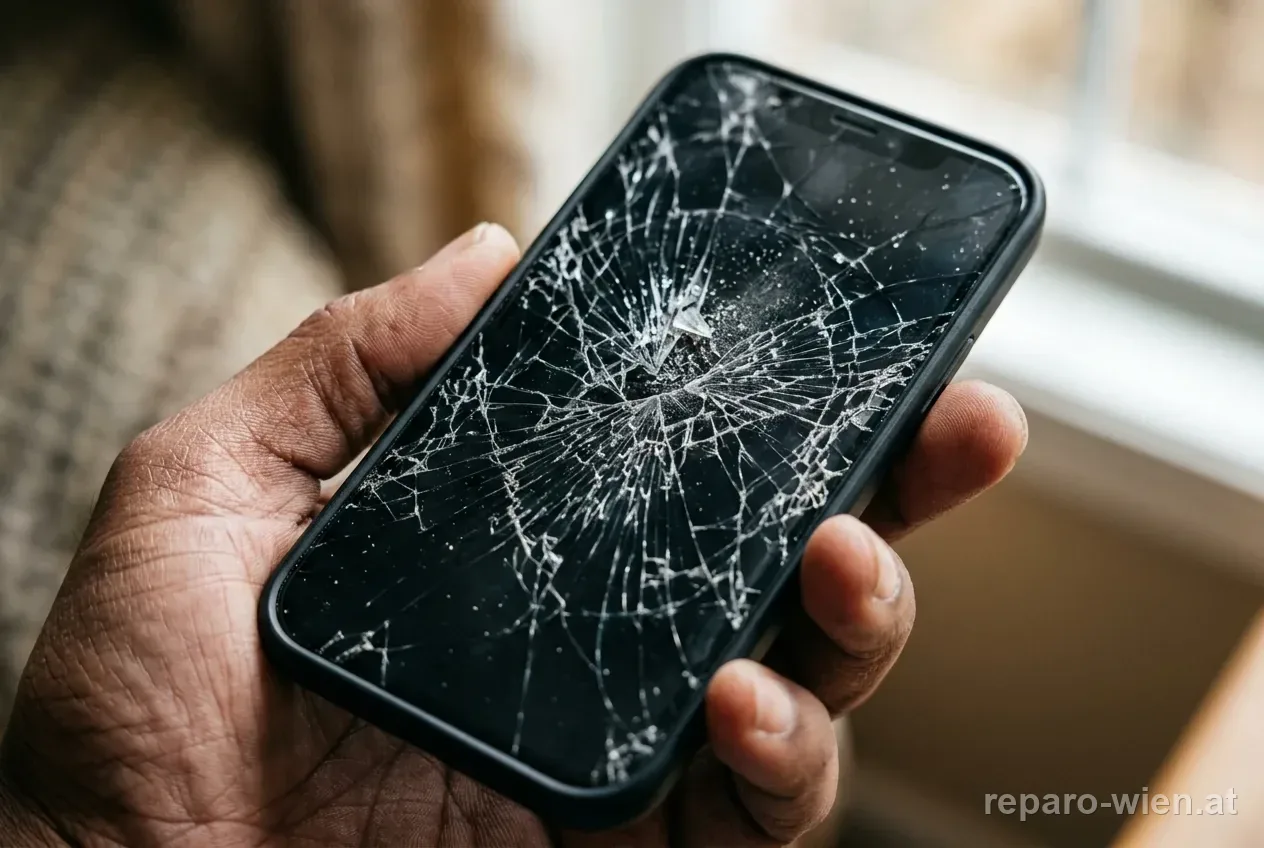
Typical display damage on the Poco C75 – what we see in the workshop
As soon as the USB-C cable is plugged in, horizontal stripes run across the LCD panel; on disconnection the image stabilises immediately. Typical after an impact: the ground path between the charging port and the display flex is mechanically disturbed, and charging currents couple into the panel as a ground loop. Without a screen replacement this recurs with every charge.
The front camera hole-punch is a structural weak point on the Poco C75 – if the device falls forward in the middle, the break often spreads star-shaped outward from the camera opening. The panel then shows milky smears in the upper half of the screen, and the touch only responds with a delay around the cutout.
After a light knock, the driver flex cable of the LCD panel can develop a hairline crack. The result: in 60 Hz mode everything is fine, but as soon as you enable 120 Hz in the system, animations stutter and scrolling feels jerky. The signal path for the higher refresh rate is disturbed – a new module fixes that instantly.
Because the 6.88-inch panel on the Poco C75 is very large, a single break point in the upper third is enough to disable the entire upper touch matrix. The keyboard at the bottom works, but icons at the top no longer open. Repairing the trace is not worthwhile; the module replacement restores the full touch area.
The Poco C75 rings, WhatsApp messages arrive, the LED in the hole-punch area blinks – but the screen stays dark. After a fall, usually the display flex has come loose from the mainboard or the panel has broken internally. The module replacement brings image and brightness back permanently.
IPS LCDs like the one in the Poco C75 react sensitively to pressure on the backlight. After sitting in a back pocket or pressure against the screen, yellowish edges or bright spots appear that no longer disappear. A fresh panel restores the even illumination.
All Poco C75 repairs at a glance.
How the Poco C75 screen repair works at Reparo
-
Book an appointment and hand over the device
Fix an appointment online or by phone. In Vienna we pick the Poco C75 up from you – at home, at the office or at a meeting point of your choice. If you live outside Vienna, you get the send-in address with packing instructions. Insured return shipping is included in the fixed price.
-
Reproduce the charge flicker deliberately
Before we open it, we test the device with an original USB-C power supply and check whether the flicker is reproducible when plugged in. This confirms the diagnosis of a ground loop and rules out other causes such as software problems or a faulty charging cable. Diagnostic check 25 EUR, waived on repair.
-
Open the back and remove the LCD module
The plastic back is released along the adhesive groove and the battery is secured. The 6.88-inch LCD module is glued to the plastic frame and connected to the mainboard via two ribbon cables. The front camera and proximity sensor are taken from the old panel – they go into the new module.
-
Check and re-set the ground point at the charging port
The core of our repair in charge-flicker cases: we use the multimeter to check the ground path between the USB-C socket and the display flex. If it is oxidised or mechanically shifted, the contact point is cleaned and re-set. Without this step the flicker would reappear later – despite a new panel.
-
Insert the new 6.88-inch LCD, click in the flex cables
The tested IPS LCD with 120 Hz is fitted with a fresh adhesive frame and the hole-punch cleanly aligned. Both ribbon cables are clicked into the mainboard and the ground points are screwed down according to a schematic plan. Once everything sits flush, the first function test follows.
-
120 Hz test and another charge test with a power supply
The Poco C75 is switched on, colour rendering and touch are checked across all screen areas. In the system we enable 120 Hz and scroll through several apps, then a USB-C power supply is plugged in and charged for 10 minutes – no flicker, no lines. Handover via pickup service or insured return shipping.
No store visit – the entire repair runs via pickup in Vienna or postal shipping from Austria.
Is the screen replacement worth it on the Poco C75?
The Poco C75 came to market in 2024 – a mid entry-level segment, but with a 120 Hz panel and 8 GB RAM unusually generously equipped for this price class. Two years later the device is far from being retired: 5160 mAh battery, USB-C fast charging, current Android with the MIUI interface. For €119 you get a fresh display module and keep a smartphone whose internal hardware usually keeps running fully after a display accident. A current Xiaomi 14 costs from about €899 new – 7.5 times the repair price.
- €119 fixed price – incl. ground check against charge flicker
- WhatsApp chats, photos and Google account stay
- 6 months warranty on panel and the fixed flicker
- Done in 2–4 hours – no long downtime
- 8 GB RAM stays – panel type (60 Hz or high-refresh) stated openly
- No learning curve, no new setup needed
- From about €899 for the current Xiaomi flagship
- Complete new setup including two working days of migration
- Noticeably more expensive for the same everyday usability
- Data transfer via Xiaomi Cloud not always complete
- The old Poco C75 has to be sold or disposed of
For a two-year-old device in this price class the fixed price of €119 is a sober investment. In charge-flicker cases especially, the repair is worth it, because the ground defect is only permanently fixed with a competent intervention – a simple panel swap without a ground check would let the problem reappear.
Which LCD module does Reparo fit in the Poco C75?
We fit a tested 6.88-inch IPS LCD complete module with a 120 Hz refresh rate and an original-compatible hole-punch cutout for the front camera. Every panel is checked on a test device before fitting: touch across all screen areas, 120 Hz fluidity in the scroll test, colour rendering with test images and – for devices with a charge-flicker history – an extended charge test with a connected USB-C power supply. The adhesive frame is freshly applied so that the panel and plastic frame sit flush and the ground path stays stable.
Poco C75 screen flickers while charging – what is behind it
The Poco C75 is not the most expensive device in the Xiaomi universe, but one of the most interesting entry-level models of 2024: 6.88 inches of screen, a 120 Hz refresh rate, 8 GB RAM and a 5160 mAh battery – properties you would have looked for in the mid-range two years ago. That is exactly why we now see devices in the workshop that are technically fit, but develop a very specific problem after an impact: the display flickers exclusively while charging. As soon as the USB-C cable is pulled, the image runs stable again. To the user it looks curious; technically it is explainable – and there is a repair precisely for that.
Pickup runs in Vienna completely without effort on your part. Outside Vienna the Poco C75 comes to us by insured shipping. All details on other repairs on the Poco C75 are on the model page – we internally manage the compatible spare parts under the Redmi 14C.
Why charge flicker on the Poco C75 is almost always a grounding problem
When a smartphone display shows stripes exclusively while charging, the charging IC is almost never defective. The cause usually lies in the so-called ground path – a line that connects the electrical grounds of the charging port and the LCD panel. After an impact this path can be slightly shifted, oxidise or develop a hairline crack. The result: the charging current that would otherwise drain cleanly to ground couples directly into the LCD signal as a ground loop. The panel shows horizontal lines, flicker or colour-cast changes – but only while charging. Without a ground re-check during the module replacement, the flicker can reappear after a short time. That is why Reparo checks the ground point as a fixed step during the screen replacement.
The hole-punch and the 120 Hz panel – particularities of the Poco C75
Unlike many entry-level devices, the Poco C75 comes with a 120 Hz LCD panel – pleasantly smooth when scrolling, but technically more demanding than a classic 60 Hz display. The driver flex cable carries a higher signal volume, and a hairline crack is enough for the 120 Hz mode to stutter while 60 Hz still runs. During the module replacement we fit a complete IPS LCD including driver electronics – the 120 Hz mode then runs as smoothly as from the factory. The hole-punch for the front camera is also cleanly aligned, so that no visible gap remains at the edge of the cutout.
Further links: All Poco C75 repairs · Redmi 14C Repair Vienna · Xiaomi Repair Vienna · All screen repairs
Frequently asked questions about the Poco C75 screen repair
What do you pay for the Poco C75 screen repair?
€119 fixed price – including a tested 6.88-inch IPS LCD module with 120 Hz, professional fitting, a ground check against charge flicker and 6 months warranty. The diagnostic 25 EUR is fully waived as soon as you place the repair order. The price is bindingly confirmed in writing before we begin.
Why does my Poco C75 flicker only when I connect the charging cable?
This is a classic grounding or ground-loop defect – usually after an impact. The ground path between the USB-C charging port and the LCD flex is mechanically disturbed, which lets charging currents couple directly into the display. Result: horizontal lines or stripes while charging, a stable image as soon as the cable is pulled. Reparo replaces the module and re-sets the ground contact.
Is it enough to change the charging cable when the display flickers while charging?
No – in 95 % of cases the cause is not the cable but the disturbed ground connection inside the device. In the diagnosis we test with several power supplies and cables. If the flicker persists, the internal ground path is defective. Only the module intervention with a ground re-check fixes the problem permanently.
What is included in the €119 for the Poco C75 screen repair?
The tested 6.88-inch IPS LCD module including 120 Hz and the hole-punch, the fitting with a fresh adhesive frame, the ground check between the charging port and the display flex, the extended charge test after the replacement and 6 months warranty on the panel and fitting work. Return shipping and pickup service are already included in the fixed price.
How long does the screen replacement take on the Poco C75?
The repair takes 2–4 hours from arrival, including the additional charge test to check for flicker. With pickup in Vienna you usually get the Poco C75 back on the same or next working day. With send-in from other federal states: 1–3 working days after arrival, including insured return shipping.
On the Poco C75, is only the glass replaced or always the entire module?
Always the entire module. On the Poco C75, glass, touch matrix and IPS panel are factory-bonded firmly together. A pure glass swap would be neither economical nor reliably durable – especially not in combination with a grounding issue, which often occurs together with the charge-flicker damage.
Does the fingerprint sensor stay functional after the screen replacement?
Yes. On the Poco C75 the fingerprint sensor sits in the side power button and is not integrated into the display. During the module replacement it is not touched – all stored fingerprints, the calibration and the unlock speed remain unchanged after the repair.
Can I drop my Poco C75 off for repair?
No, Reparo has no open store for spontaneous visits. We work exclusively via our pickup service within Vienna or via postal send-in from all of Austria. The appointment is fixed in advance online or by phone – that saves you the trip to us.
How does the pickup service for the Poco C75 in Vienna work?
You book a time slot online or by phone and give a Vienna address – home, office or a meeting point of your choice. We arrive on time, take the Poco C75 with us and deliver it back to the same address after the repair is finished. You simply stay where you are.
How do I send the Poco C75 to Reparo from the federal states?
After booking the appointment you receive the send-in address and packing instructions. Pack the device with padding and ship it insured by post. Whether from Graz, Linz, Salzburg, Innsbruck, Klagenfurt or Bregenz – the insured return shipping after completion is included in the fixed price.
Do WhatsApp chats and photos remain during the screen replacement?
Yes. With a pure screen replacement only the panel is replaced – the internal storage, WhatsApp history, photos, contacts, installed apps and Google account stay untouched. We nonetheless recommend a Google or Xiaomi Cloud backup before sending in as a safety measure.
What warranty do I get on the new Poco C75 display?
6 months warranty on the fitted LCD panel, the fitting work and the ground correction against charge flicker. Repair-related problems – such as pixel faults, touch dropouts, a recurrence of the flicker or loose flex connections without a new drop – are remedied free of charge in this period. New drop damage is not covered.
Do you fit an original display or a compatible aftermarket part?
We fit a high-quality aftermarket LCD module that is functionally equivalent to Xiaomi original quality – brightness, colour fidelity, 120 Hz and touch response are not distinguished from the original in everyday use. Before the repair we inform you about the available quality level and you make the final decision.
Is the repair still worth it on the two-year-old Poco C75?
Yes – clearly. The 2024 Poco C75 still has many years ahead of it technically: 5160 mAh battery, 120 Hz display, 8 GB RAM, current Android. Buying a new Xiaomi 14 costs from about €899, more than 7 times the repair price. For €119 you get a fully usable device back, without a new setup.
Can the Poco C75 be repaired after water contact with a defective display?
The Poco C75 has no IP protection certification. After water contact we first check whether only the display or also the mainboard, battery and USB-C socket are affected. The board is cleaned by ultrasound if necessary before the new LCD is fitted. Initial diagnostic 25 EUR, waived on repair. The sooner the device comes to us, the better the chances.
Poco C75 screen repair in Vienna – pickup service or send-in
€119 fixed price · 2–4 hours · ground check against charge flicker · 6 months warranty · pickup service Vienna or send-in from Austria